機能
CallingMessagingGroupsChannelsMeta AIStatusSecurityParental controls
PrivacyBlogAppsHelp CenterWhatsApp for Business
Log In
Download
ダウンロード
ブログに戻る
WhatsAppブログ

View Once Photos and Videos on WhatsApp
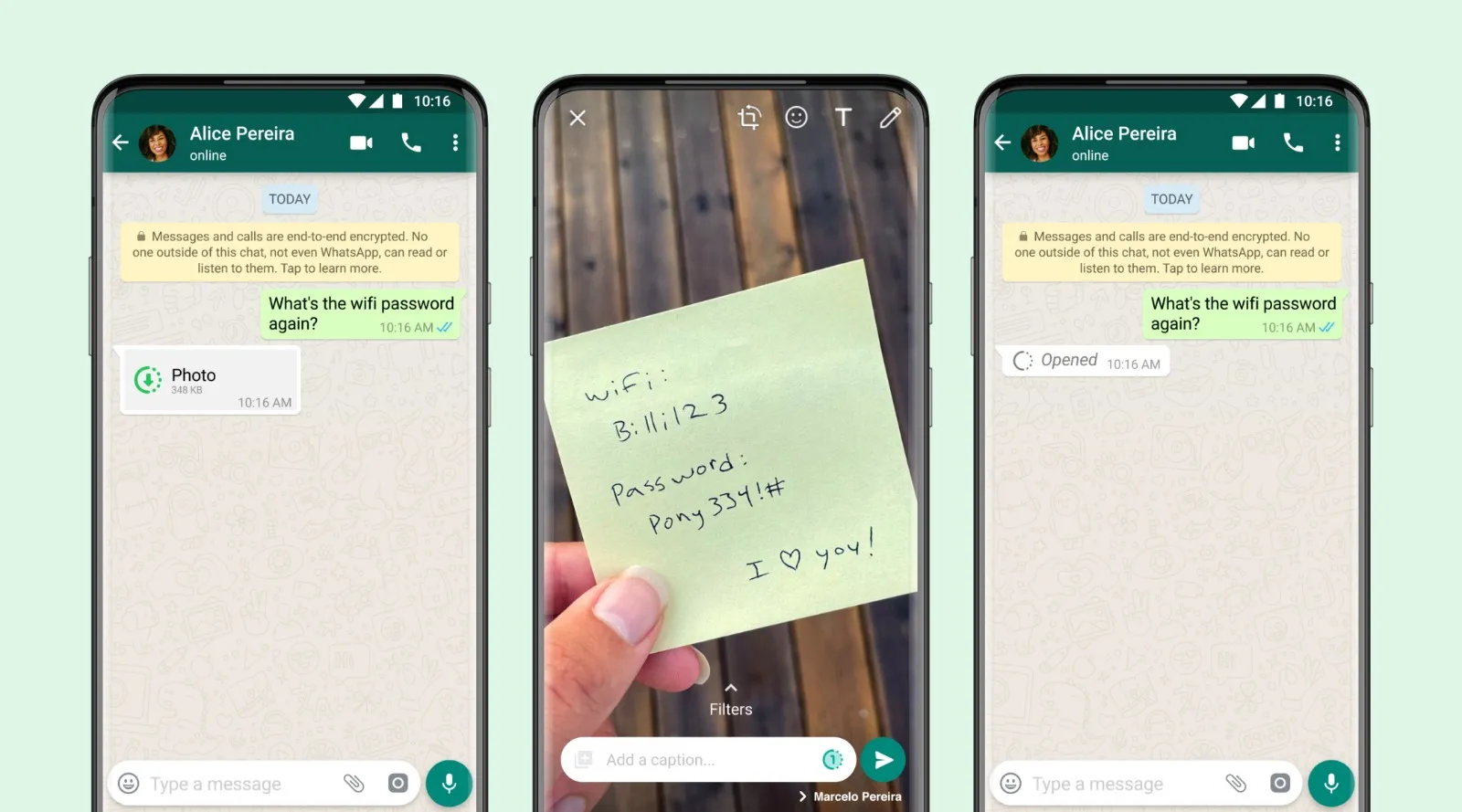
While taking photos or videos on our phones has become such a big part of our lives, not everything we share needs to become a permanent digital record. On many phones, simply taking a photo means it will take up space in your camera roll forever.

That’s why today we’re rolling out new View Once photos and videos that disappear from the chat after they’ve been opened, giving users even more control over their privacy.

For example, you might send a View Once photo of some new clothes you’re trying on at a store, a quick reaction to a moment in time, or something sensitive like a Wi-Fi password.

As with all the personal messages you send on WhatsApp, View Once media is protected by end-to-end encryption so WhatsApp cannot see them. They will also be clearly marked with a new “one-time” icon.

After the media has been viewed, the message will appear as “opened” to avoid any confusion about what was happening in the chat at the time.

We’re rolling out the feature to everyone starting this week and are looking forward to feedback on this new way to send private and disappearing media.

You can read more about how to try it out here.

August 3, 2021

ダウンロード
WhatsAppメインロゴ
WhatsAppメインロゴ
ダウンロード

取り組み

  • 機能
  • ブログ
  • セキュリティ
  • ビジネス向け

会社概要

  • 基本情報
  • 求人情報
  • ブランドセンター
  • プライバシー

WhatsAppを利用する

  • モバイル
  • デスクトップ
  • タブレット
  • WhatsApp Web

サポートが必要な場合

  • お問い合わせ
  • ヘルプセンター
  • アプリ
  • セキュリティ勧告
ダウンロード

2026 © WhatsApp LLC

利用規約とプライバシーポリシーサイトマップ
  • Afrikaans
  • azərbaycan
  • Bahasa Indonesia
  • català
  • čeština
  • dansk
  • Deutsch
  • eesti
  • English
  • español
  • Filipino
  • français
  • Gaeilge
  • hrvatski
  • italiano
  • Kiswahili
  • latviešu
  • lietuvių
  • magyar
  • Melayu
  • Nederlands
  • norsk bokmål
  • o‘zbek
  • polski
  • Português (Brasil)
  • Português (Portugal)
  • română
  • shqip
  • slovenčina
  • slovenščina
  • suomi
  • svenska
  • Tiếng Việt
  • Türkçe
  • 日本語
  • 繁體中文(香港)
  • 繁體中文(台灣)
  • 简体中文
  • Ελληνικά
  • български
  • қазақ тілі
  • македонски
  • русский
  • српски
  • українська
  • עברית
  • اردو
  • العربية
  • فارسی
  • मराठी
  • हिन्दी
  • বাংলা
  • ਪੰਜਾਬੀ
  • ગુજરાતી
  • தமிழ்
  • తెలుగు
  • ಕನ್ನಡ
  • മലയാളം
  • ไทย
  • 한국어