April 3, 2019
New Privacy Settings for Groups
WhatsApp groups continue to connect family, friends, coworkers, classmates, and more. As people turn to groups for important conversations, users have asked for more control over their experience. Today, we're introducing a new privacy setting and invite system to help you decide who can add you to groups.
To enable it, go to Settings in your app, then tap Account > Privacy > Groups and select one of three options: “Everyone,” “My Contacts,” or “My Contacts Except.” “My Contacts” means only users you have in your address book can add you to groups and “My Contacts Except” provides additional control for who among your contacts can add you to a group.
In those cases, an admin who can’t add you to a group will be prompted to send a private invite through an individual chat, giving you the choice of joining the group. You'll have three days to accept the invite before it expires.
With these new features, users will have more control over the group messages they receive. These new privacy settings will begin rolling out to some users starting today and will be available worldwide in the coming days to those using the latest version of WhatsApp.
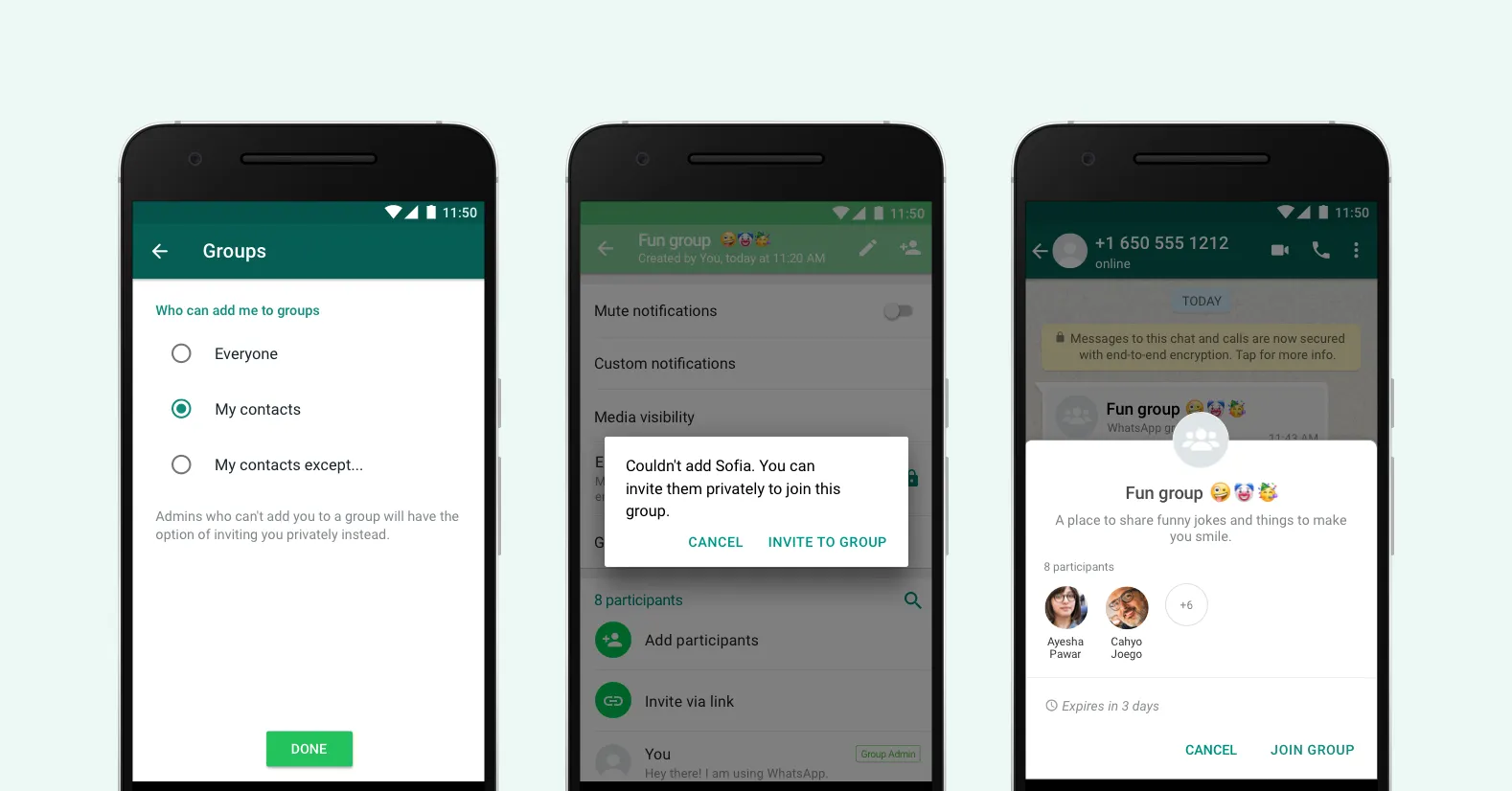
UPDATE: Based on feedback from users during our initial rollout, instead of the “Nobody” option we are now providing a “My Contacts Except” option. This allows you to choose to exclude specific contacts or “select all”. This update is rolling out to users around the world on the latest version of WhatsApp.
Last Updated: November 5, 2019